About a month ago, someone asked a straightforward question in a leadership meeting: "How is Account X doing in terms of a use case?"
The room went quiet for a beat. Then five people gave five partial answers. The CS lead had a subjective health rating from a recent check-in. Engineering knew about two open bugs but wasn't sure if they were resolved. Product had usage data. Sales knew the renewal date and deal size. Nobody had the complete picture, and nobody could assemble it in real time.
The answer was: "Let me follow up."
If you have worked in B2B, you have been in this room. I have seen this scene play out at every company and team I have worked at. Different accounts, different rooms, same outcome. The data exists, scattered across four or five tools that never talk to each other.
This was the before.
The after looks different. Now, when someone asks "How is Account X doing?", the answer takes three seconds. Green, yellow, or red. If it's red, you can see why: three open bugs in Linear, usage down 30% in Mixpanel, CS flagged the relationship as "at risk" in Airtable, renewal is in 60 days per Salesforce. All on one screen. The data is right there, and the conversation can actually happen. Where there are gaps, those are visible too, which means the follow-up is specific: "We're missing a recent CS assessment for this account" rather than a vague "let me look into it."
I built this. Not because my team couldn't. Because the person closest to the problem, armed with the right tools, is now the fastest path to a solution. That changes who should build what in any organization, and it is the core of what "AI-first culture" actually means.
Full disclosure: I work in AI. I am President of R&D at an enterprise AI company. But the problem I am describing has nothing to do with AI products. It is an operational visibility problem that exists at every B2B company I have ever talked to. I built it using Claude Code, an AI coding assistant, over a few evenings. The second version, with bug tracking and SLA enforcement, took another few days.
The technology part was straightforward. The organizational part was where it got interesting.
The PM work comes first
Before I wrote a single line of code, I found a partner. A strong customer success lead who had been living with the same frustration from the customer-facing side. We spent time upfront doing the PM work that makes or breaks a tool like this: What does "healthy" actually mean? Which signals matter and which are noise? None of those are technical questions. They are cross-functional alignment questions. Getting them right before building meant the first version was already something both teams could trust.
This step has nothing to do with AI. It is the same discipline that has always separated tools people use from tools people ignore. AI changes the speed of everything after.
From question to working tool in hours
I have an engineering background, but I do not write code nearly as much as I used to. AI coding tools changed that equation. I described what I wanted, step by step, and the AI wrote the code. The skill that mattered was knowing what to build and why, not knowing how to code it.
The first working prototype took about four hours. A Python script that pulls from four sources (Linear, Mixpanel, Airtable, Salesforce), matches the data to customer accounts, and generates a static HTML page. No backend server. No database. Just a script on a cron schedule that pushes an updated HTML file.
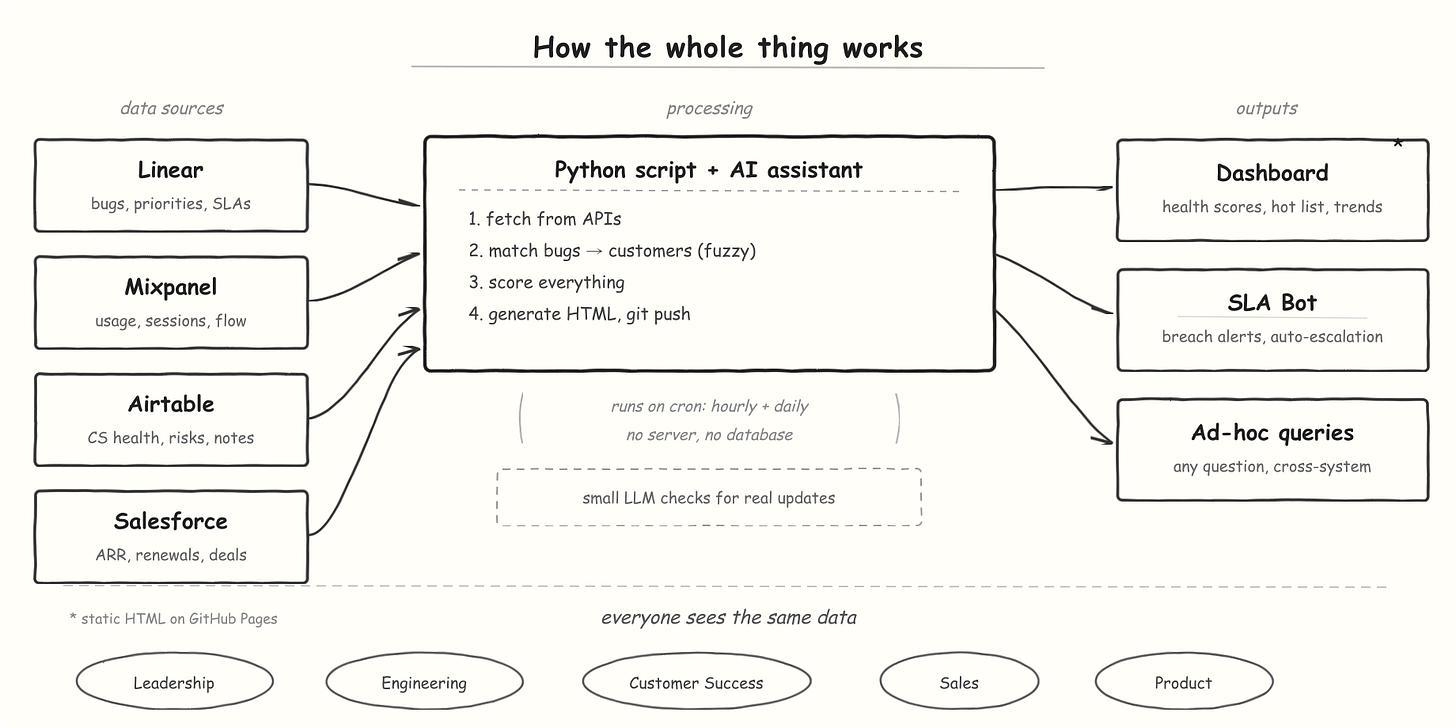
The first version was ugly. The health score algorithm was naive. AI ensured I did not have to spend hours learning which API to call. And it worked.
I showed it at the next leadership meeting and something shifted in the room. People leaned in. They started asking questions about specific accounts. "Why is this customer's score dropping?" "Can we see the bug list for that account?" "What does engagement look like quarter over quarter?"
Within two weeks, I had iterated through a dozen versions. Added SLA tracking. Added trend indicators. Built an automated bot that posts warnings when bug resolution timelines slip. Connected it to our project management system so every bug links back to the customer it affects. The total build time was a few weeks of evenings. Through traditional channels, this would have been a multi-month effort with product specs, design reviews, and sprint planning, competing for priority against actual customer-facing work.
The speed mattered because fast iteration meant the tool evolved with real feedback instead of a spec.
What the dashboard actually shows
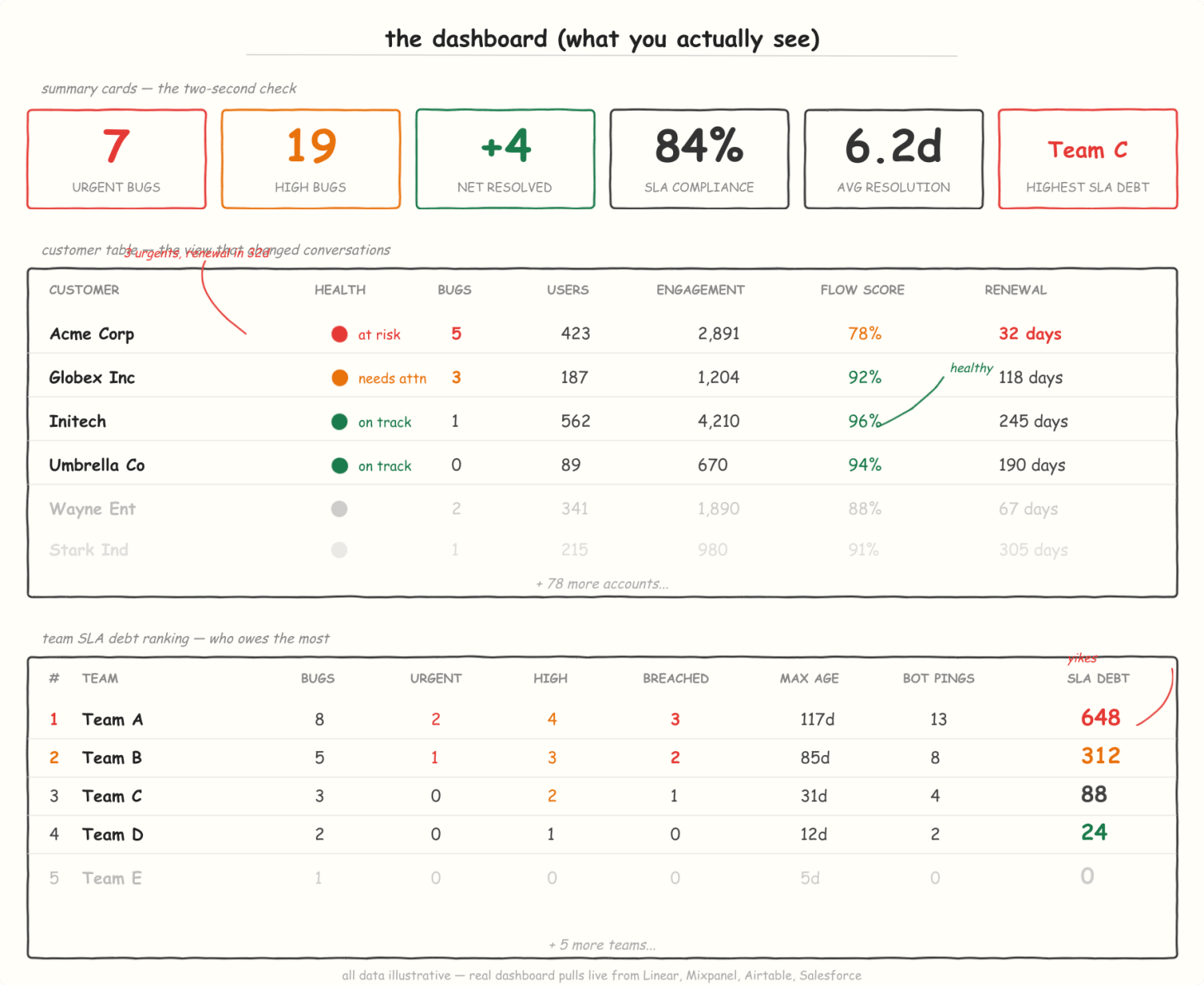
The actual dashboard has considerably more: flow score analysis, weekly trend views, a full bug hot list, customer drill-down modals, and the SLA bot's escalation history. The above is a simplified sample for illustration.
The top row is a two-second health check: summary cards showing bug counts with SLA breach rates, net bugs this week, the team with the highest SLA debt, overall compliance rate, and mean time to resolution. You know immediately whether things are getting better or worse.
The customer table is the view that changed conversations. Each row is an account with usage metrics, days to renewal, open bugs, and color-coded health status pulled from three sources: the CS lead's subjective assessment, bug severity, and flagged risks. Click any customer and a modal opens with the full picture: every open bug with age and assignee, the CS lead's progress notes, usage trends, and Salesforce deal details. Everything anyone needs to answer a question about an account is on one screen.
Every team sees the same data. That turned out to be the most important design decision. When engineering and CS look at the same customer row and see the same bug count, the same usage trend, and the same renewal date, the conversation is fundamentally different.
The SLA bot turned out to be more impactful than the dashboard itself. For every bug that has breached its SLA, the bot posts a comment directly on the issue: the priority, the assignee, the age in days, which customers are affected. If there is a real update, it backs off. If not, it escalates. People respond to specific, contextual, timely nudges. They ignore dashboards they have to remember to check.
The bot sits on top of ownership culture. Everyone on the team already cares. Accountability is a muscle, and like any muscle it needs training. The bot provides the training. It turns good intentions into consistent habits.
What changed
The dashboard has been live for about four weeks. Here is what happened:
Cross-functional conversations got specific. Before, customer health discussions were qualitative. "I think Account X is unhappy." Now the conversation starts with a number and a trend line. "Account X dropped from 78 to 64 this month, driven by three unresolved bugs and a 40% decline in weekly active users." The specificity forces better follow-up.
Engineering prioritization got sharper. An engineer had a P2 bug in his queue for a week. When the dashboard showed it was blocking three accounts with renewals in the next 60 days, he moved it ahead of a P1 that affected no active customers. That is a judgment call that no ticketing system's priority field can encode. A human looking at the right data can make it in seconds.
Customer success started using it for renewal preparation. Instead of building a one-off account health slide deck before each quarterly business review, they pull up the dashboard and walk through the live data. Customers have also responded well to the resulting level of transparency: "You already know about these issues and you're tracking them."
SLA compliance improved significantly within the first month. The transparency is uncomfortable at first. But it shifted the culture from "we'll get to it" to "we need to resolve this today."
These are all good outcomes. The more interesting story is what happened next.
The real shift: who builds what
The CISO leaned in
Building the dashboard required connecting to four different systems. The early versions had credentials management that wasn't enterprise-grade yet.
Our CISO noticed. Rather than shutting it down, he leaned in. We are trying to be an AI-first company, and that means making it safe and easy for people to build tools like this, not blocking them. He and another person on his team built shared infrastructure: secure secrets management, approved API access patterns, a lightweight hosting setup. Now anyone building internal tools with AI assistants does not have to reinvent the security layer. The dashboard became the proof case for an organizational capability.
That is the difference between one person building a tool and a company building a culture.
Every question became askable
The less obvious shift: I started asking questions I would not have thought to ask before. When four systems feel like one fabric, you stop thinking in terms of which tool has the answer. You just ask.
Which customers have the highest ratio of open issues to engagement? What are the trending problem areas this quarter? Easy questions. They were hard to answer, because assembling the data took longer than the insight was worth. When that cost drops to zero, you explore. You find things you were not looking for. That is what AI-first actually feels like in practice: the questions themselves change.
Non-engineers started building
Then other people started building. A PM built automated copy evaluations for a specific customer's brand guidelines. Someone on the strategy team built a pricing calculator that pulls live usage data and models different tier scenarios. They are domain experts who finally have the tools to solve their own problems. The backlog of "I wish I had a tool that..." is getting cleared, by the people who actually need the tools.
What starts as one leader's side project becomes organizational infrastructure once the security team makes it safe and repeatable. After that, building spreads. It works whether you have 20 people or 20,000. The seed project will be different: maybe it is a customer dashboard, maybe it is a sales report, maybe it is an onboarding workflow. The sequence is the same.
Who keeps the thing alive
Building the dashboard was one problem. Who maintains it? Who adds the next view or fixes a score when someone spots an edge case?
In a traditional setup, this is where internal tools go to die. The builder moves on, nobody owns it, and six months later people are back to spreadsheets.
AI coding tools changed this. When someone wants a change, I ask for a one-pager: what do you want and why. I hand it to my AI coding assistant, and most of the time the change is live within hours. Sometimes in meetings, someone points out an issue and I fix it right there, while the conversation continues. No "let me file a ticket." Just: fixed, refresh, there it is.
For anything beyond a quick fix, the whole thing lives in an internal GitHub repo. Anyone on the team can open a pull request: add a new view, tweak a score, connect a new data source. The one-pager is for people who want to describe what they need. The repo is for people who want to build it themselves.
That speed of iteration keeps the tool alive in a way that organizational process never could, because the cost of each improvement is so low that there is no reason to defer it.
That said, speed does not mean I got everything right.
What I got wrong
The health score missed a real risk. An account showed green: steady usage, no open urgents, CS assessment up to date. What the score missed was that their champion had quietly left the company, and the new stakeholder was evaluating competitors. By the time the score turned yellow, the conversation was already difficult. The tool needs to account for lagging indicators, and I am still working on that.
I over-automated the notifications early on. The bot posted too many comments, and people started ignoring them. I had to dial it back to only the most critical signals: SLA breaches on accounts with upcoming renewals, health score drops below a threshold, and new urgent bugs on already-stressed accounts. Less frequent, higher signal.
A dashboard gives you visibility. It does not give you ownership. The system only works if people keep it fed. If habits slip, the health scores go stale and people stop trusting them. The tool amplifies whatever operating culture already exists. It does not create one.
That last point matters, because it gets at what "AI-first culture" actually means.
What AI-first culture actually looks like
Most conversations about AI-first culture focus on the product: does it use AI, does it sell AI. The more interesting question is how AI changes the way an organization operates internally.
What I saw was a sequence that compounded. Each new tool someone built made the next one easier to justify and safer to deploy. That compounding is the culture.
AI coding tools give your leaders the ability to build the specific, idiosyncratic, "no vendor sells this" internal tools that change how an organization sees itself. The leader who builds has an advantage: they know exactly what question needs answering, because they have been living with the absence of that answer.
The companies pulling ahead are the ones where leaders are building. And if you are the exec setting the tone, the most important thing you can do is make it safe to try: fund the experiment, clear the compliance path, and celebrate the first ugly version. The technology just made it possible to start this week instead of next quarter.